Your agents already cover for each other. Now it's a system.
Run coverage as your own network — your branding, your rules, your roster — and keep a local network in reserve for the showings nobody inside can take. Decide once where requests go: kept inside your walls, offered to your agents first, or opened straight to the network. It then runs itself. That combination is the part no national marketplace gives you.
Three broadcast modes. One decision, made once.
Every showing request your agents post follows your organization's policy — no per-request babysitting, no coverage leaking outside before your own roster gets its shot.
Your requests are visible to your agents only — forever. Coverage stays entirely inside the brokerage. Ideal for teams with strict client-confidentiality policies.
Your agents get an exclusive first look — you set the window, from 1 hour to 7 days. If nobody inside claims it, the request opens to the wider local network automatically.
Requests broadcast to every agent covering the area immediately. Maximum fill speed when coverage matters more than exclusivity.
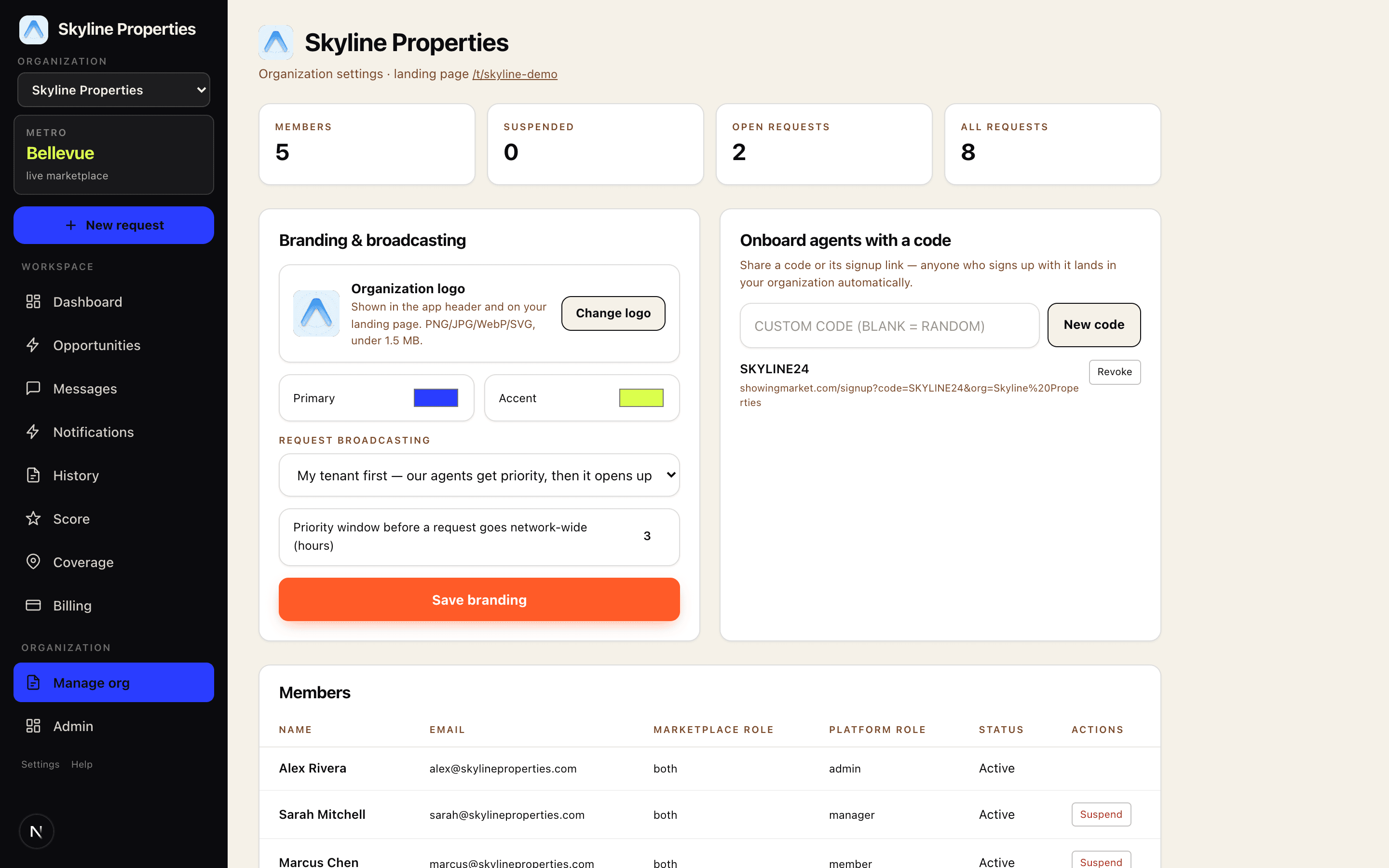
The whole organization on one screen
This is the real management console — members, join codes, branding, broadcasting policy, and live request counts. Most weeks you won't need to open it.
Built to not need an admin
Share a join code or its signup link — anyone who signs up with it lands in your organization automatically, already inside your broadcast policy. No invitations, no CSV imports, no IT ticket.
Upload your logo and set your colors. Your agents see your organization in the app header, and your branded landing page lives at your own /t/your-name link.
Your firm can have several, appointed by ShowingMarket when you onboard. They run the roster, codes, branding and broadcast policy — and nobody inside the organization can appoint another, so there is no path to a broker being promoted or locked out from within.
An agent leaves the brokerage? Suspend them and they're out of your requests and your roster instantly — restore is one click too. Every join code can be revoked the same way.
Set what must happen before an assignment can proceed — a signed buyer agreement, an acknowledged access policy, whatever your state and your firm require. The platform refuses the check-in until it is done; it does not grey out a button and hope. Requirements can differ for a buyer showing and a contractor let-in, because those are not the same act.
Per-showing payments run through Stripe — authorized when a request posts, captured when the work is approved. No monthly invoice, no seat licenses, no minimums. Internal coverage can be set to no fee at all, in which case no payment rail is involved.
What a designated broker can actually see
Supervision is the part that has to hold up after the fact, not the part that looks good in a demo. Every item below is enforced by the database rather than by the app asking nicely.
Open any assignment and read it end to end — who was offered it, who took it, what was said, where they physically were at check-in and check-out, what evidence closed it, and what was paid. Entries appear only where a real timestamp exists; nothing is inferred.
Not a report you remember to run. Assignments that cannot proceed, escalations first, aged from the moment they became a problem. Resolved items leave it. Exportable, with a link back to each audit trail.
An open-house attendee asks the host to represent them. The host raises it in one tap, the assignment stops, and they are shown your firm's own instruction — your words, not ours. Only a designated broker can resolve it, and only with a reason.
Export the firm's complete record — members, coverage, assignments, the full compliance trail, every document reference — as one file, with no ticket and no waiting period. Deletion is a request with a scope, because erasing a firm touches records other people are party to.
Live in three steps
- 1Contact us below — we set up your organization for free: name, logo, colors, and the broadcast policy that fits how you work.
- 2Send one join code to your roster. Agents sign up free, enter the code, and they're in — under your branding and inside your broadcast policy.
- 3Your agents post and cover showings under your rules. You check the dashboard when you feel like it.
The whole thing, in one document
An eighteen-page walkthrough of what your agents see, what you control, and what the compliance record looks like — every screen captured from running software, not designed for a slide. It ends with the questions brokerages actually ask us, answered.
- OnboardingRoster upload, join codes, and who sends the invitations.
- ControlsBroadcast policy, coverage distribution, and what a designated broker sees.
- ComplianceFirm policy enforced server-side, the exception queue, and the audit trail.
Coverage is already happening. Put your name on it.
Tell us who you are and we'll set up your organization — branding, broadcast policy, and your join code — free. No setup fee, no subscription; your agents pay only per completed showing, like everyone else.