Everything you need to run an open house this weekend — free
Sign-in sheets, follow-up messages, and the two checklists, ready to use right now. No email, no account, no watermark. The tools that need an account are marked, and you can ignore them.
Built by a licensed Washington broker. Available nationwide.

What's in the kit
Four styles — classic, privacy-forward, luxury or broker open, and rental — in PDF and editable Word.
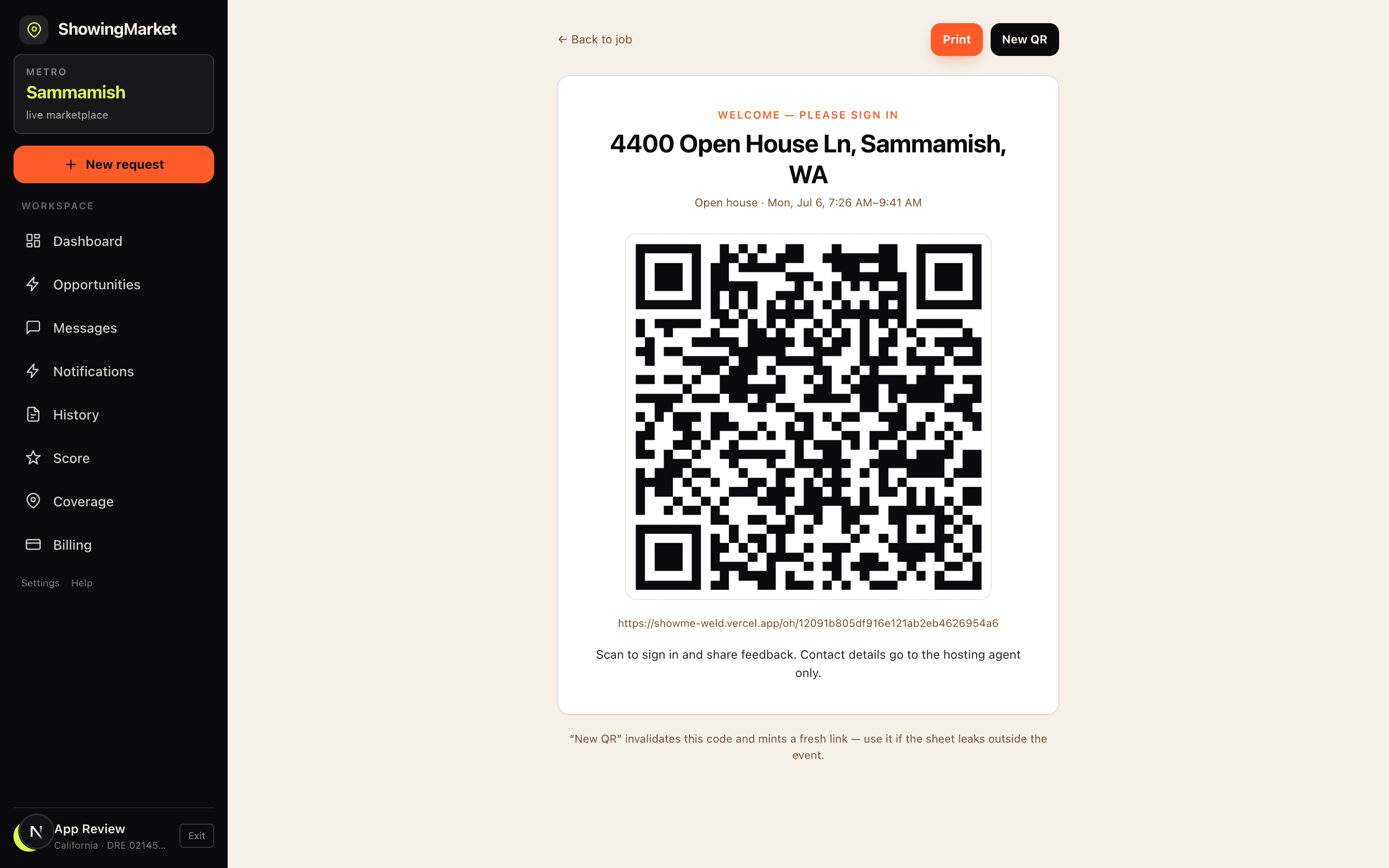
A code by the door. Visitors sign in on their own phone; entries land in your list as they arrive.
Six messages for the situations that actually come up, including the represented visitor and the neighbour.
Four emails: same-day details, feedback request, similar listings, and the seller activity summary.
Visitor counts, ratings and written comments for one open house, ready to send the same day.
Day-before through same-day, including the security steps most checklists leave out.
Placement, wording, and a counting method so you stop losing signs.
Cannot make it? Post the open house and a licensed local agent covers it for a fee you set.
What setting it up actually looks like
Twenty-three seconds, start to finish: book the open house, print the sheet, put it on the counter, and read who came through afterwards. No app for visitors to download and nothing to carry but paper.
- ·Print the sign-in sheet — free, no account, no email
- ·Set it by the door and greet people instead of chasing signatures
- ·Visitors sign in from their own phone, in a browser
- ·See who came through, and send the follow-up the same evening
The printable sheets, the follow-up messages and both checklists need no account. The QR sign-in shown here needs a free ShowingMarket account, because each code belongs to a specific open house.
1. Printable sign-in sheets
Four styles. Download the one that fits the listing — the classic sheet suits most weekends.
More detail on each style, and what to put on a sign-in sheet, is on the sign-in sheet templates page.
2. QR-code digital sign-in
A code by the door instead of a clipboard. Visitors scan with their phone camera and sign in from a web page — nothing to download on their side. Entries appear in your list as they arrive, so there is nothing to type up afterwards and no handwriting to decipher.
Creating one needs a free account, because the sheet belongs to a specific open house. Print the paper sheet above as a backup either way — signal fails, phones die.
3. Follow-up text messages
Square brackets are the bits to change. Send the same-day one within a few hours — by Monday they have seen four other houses.
Hi [First name] — [Your name] here, I hosted the open house at [address] today. Thanks for stopping by. I've put the listing details and floor plan here: [link]. Happy to answer anything, and no pressure either way.
Name the address. Anyone touring on a Saturday saw four houses and will not remember which one you are.
Hi [First name] — thanks for coming through [address] today. I've sent the details over to [their agent's name] so you have everything on your side. Good luck with the search.
Written to be forwardable. If they are represented, the professional move is to serve them and stop — and to be seen doing it.
Hi [First name] — you mentioned [specific thing they liked] at [address]. Sellers are reviewing offers [timing], so I wanted to make sure you had that. Want me to set up a private showing this week?
The specific detail is the whole message. Without it this is a template and reads like one.
Hi [First name] — following up on your question about pricing at [address]. Three comparable sales in the last 90 days: [comp 1], [comp 2], [comp 3]. Happy to walk through how they compare if useful.
Hi [First name] — good to meet you at [address] on [day]. You mentioned you're just up the street. If you ever want to know what your own place would sell for, I'll put something together, no obligation.
The highest-value person at most open houses is the neighbour, and they are the one most often ignored.
Hi [First name] — I'm holding [new address] open on [day, time]. It's [one line on why it suits what they said they wanted]. Come by if it's useful.
4. Follow-up email templates
Longer than the texts, and worth the extra minute. The seller summary is the one that keeps you the listing.
Subject: [Address] — details and floor plan

Hi [First name],

Thanks for coming through [address] today. Everything is attached and linked below so you have it in one place:

· Listing and photos: [link]
· Floor plan: [link]
· Disclosures: [link]
· HOA / taxes / utilities: [one line each]

A few things that came up today that may be useful: [note one or two real questions visitors asked, with the answers].

If you'd like a second look without the crowd, I can arrange a private showing this week.

[Your name]
[Brokerage] · [Phone] · [Licence #]
The 'things that came up' block is what makes this worth opening. It is the one paragraph a template cannot write for you.
Subject: Quick question about [address]

Hi [First name],

Thanks again for visiting [address] on [day]. I'm putting a summary together for the sellers and honest reactions help them more than polite ones.

If you have thirty seconds: what stopped it being the one? Price, layout, location, condition, or something else entirely?

No sales pitch attached — I'd genuinely just like to know.

[Your name]
Low friction, one question, an explicit promise not to sell. Answer rates drop sharply with every extra question.
Subject: Three others like [address]

Hi [First name],

You mentioned you're looking for [what they said — beds, area, budget, feature]. [Address] wasn't quite it, so here are three that might be closer:

1. [Address] — [one line on why]
2. [Address] — [one line on why]
3. [Address] — [one line on why]

Happy to show you any of them, or to set up alerts so you see this kind of thing first.

[Your name]
[Brokerage] · [Phone]
Only send this to visitors who told you they are unrepresented. Sending it to someone else's client is how you lose a referral relationship.
Subject: [Address] — Saturday open house summary

Hi [Seller name],

Here's how the open house went.

Traffic: [n] groups through the door between [start] and [end].
Represented: [n] came with their own agent; [n] were unrepresented.

What people responded to: [two or three specifics].
What came up more than once: [the recurring objection, stated plainly].

My read: [one honest paragraph — what you would change, or why you would hold].

Next open house is [date] unless you'd like to adjust anything first.

[Your name]
Sellers rarely complain about traffic. They complain about not hearing anything. Sending this before it is requested is most of the job.
5. Seller feedback report
If visitors sign in with the QR code, the report assembles itself: how many came, how many arrived with their own agent, the star ratings, and the written comments. Print it or send it the same evening — the email template above is written to carry it.
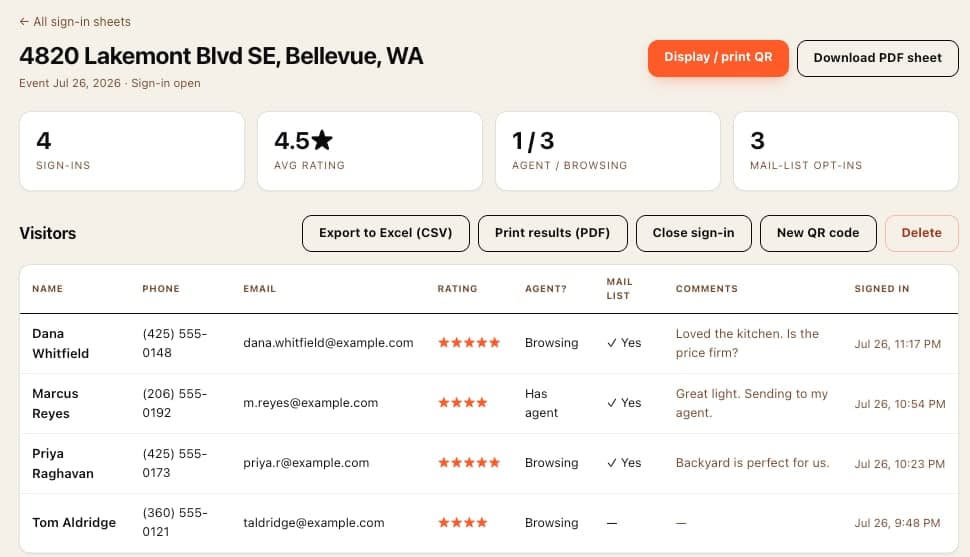
Needs a free account and a QR sign-in sheet, because it is built from that specific open house's entries.
6 & 7. The two checklists
Open house setup and closing checklist
Everything that has to happen before the first visitor and after the last one. Print it, or work down it on your phone.
- Confirm the open house time with the seller in writing.
- Confirm the seller and pets will be out, and agree where they will be.
- Ask where valuables, medication, mail and firearms are stored — and that they are secured.
- Check the lockbox or access code works. Do this yesterday, not on the doorstep.
- Print sign-in sheets, or set up the QR sign-in and test the scan on your own phone.
- Charge your phone, and pack a charger and a battery pack.
- Load the car: directional signs, stakes, mallet, balloons, pens, hand sanitiser, business cards, shoe covers.
- Print listing sheets, floor plan, disclosures, HOA summary, utility costs.
- Post the open house on social and to your local agent group.
- Set directional signs on the approach routes (see the sign checklist below).
- Open blinds and curtains; turn on every light including closets and the range hood.
- Set the thermostat to comfortable — cold in summer, warm in winter.
- Walk the house once as a buyer would, and fix what you notice.
- Deal with smells before anything else: bins out, litter tray out, windows open.
- Unlock the rooms buyers should see; lock the ones they should not.
- Put the sign-in sheet or QR card by the door, with two working pens.
- Set listing sheets on the kitchen island, not by the door — it gives people a reason to walk in.
- Clear the driveway so buyers can park.
- Text the seller that you have arrived and the house is set.
- Greet everyone. Ask them to sign in before they tour, not after.
- Ask whether they are working with an agent — and note the answer.
- Let people walk ahead of you; keep exits behind you.
- Never leave the entry unattended when someone is upstairs.
- Write down real reactions as they happen — you will not remember them at 5pm.
- Answer what you know, and say plainly when you will find out the rest.
- Note anything that goes wrong with the property so the seller hears it from you first.
- Collect every directional sign. All of them, including the one on the far corner.
- Close and lock all windows and doors, including the slider and any side gate.
- Return thermostat, blinds and lights to how you found them.
- Check every room before locking — people fall asleep in open houses more often than you would think.
- Return the key to the lockbox and confirm it is closed and locked.
- Photograph the sign-in sheet before it leaves the house, in case the paper does not survive the drive.
- Text the seller that you are leaving and the house is secure.
- Enter every sign-in into your CRM while names still have faces attached.
- Send the same-day thank-you text to everyone who left a number.
- Send the seller the activity summary before they ask for it.
- Route represented visitors back to their own agent.
- Diary the neighbours for a valuation conversation later in the month.
Directional sign checklist
Signs are the only marketing that runs while you are inside the house. Most open houses lose traffic here rather than online.
- Check the municipal sign rules for the city you are in — placement and timing vary by jurisdiction.
- Check HOA rules if the home is in a managed community.
- Never place a sign on private property without the owner's permission.
- Keep signs off medians, traffic islands and anywhere they block a sightline.
- Start from the nearest arterial road and work in — that is the route strangers actually drive.
- One sign at every decision point. A turn without a sign is where you lose people.
- Place signs on the right-hand side, angled toward oncoming traffic.
- Set them back far enough from the corner that a driver can read and still turn.
- The last sign goes at the property itself, so people know they have arrived.
- Add a balloon or flag to the property sign — motion is what catches the eye.
- Count the signs out loud as you place them, and write the number down.
- "OPEN" and an arrow, readable at 30 mph. Nothing else.
- Your name and number belong on the property sign, not the directional ones.
- Do not put the address on directional signs — it slows drivers down and adds nothing.
- Check the arrow points the right way before you drive off. This is the most common single mistake.
- Collect in reverse order, so the count works backwards to zero.
- Compare against the number you wrote down.
- A sign left overnight is a citation risk, a lost sign, and a bad look for the seller.
Can't be there on Saturday?
Post the open house with the fee you choose and a licensed local agent covers it. You write the instructions, they follow them, and the sign-ins and feedback come back to you. Every claim carries a non-solicitation agreement, so the client stays yours.
Coverage is live nationwide. The kit above is free either way — no account needed.
Questions
The downloads and templates are free with no account and no email required — sign-in sheets, follow-up texts, follow-up emails, and both checklists. Creating a QR sign-in sheet and pulling the seller feedback report need a free ShowingMarket account, because they are tied to a specific open house. Booking another agent to host is the only part that costs money.
No. The PDF and Word files download directly. There is no email gate, no watermark, and no account step in front of them.
Yes. Every sign-in sheet has an editable .docx version that opens in Word, Google Docs, or Pages. The follow-up messages are plain text you can paste anywhere and change freely.
The printable sheet is paper by the door — free, works with no signal, and you type the entries up afterwards. The QR sign-in puts a code by the door instead: visitors sign in on their own phone, entries appear in your list immediately, and nothing needs transcribing. Most hosts print the sheet as a backup.
Visitor count, how many arrived with their own agent, star ratings, and the written comments visitors left — assembled from the QR sign-ins for a single open house so you can send the seller something concrete the same day.
Post it on ShowingMarket with the fee you choose and a licensed local agent covers it. You set the instructions, they follow them, and the sign-ins and feedback come back to you. The client stays yours — every claim carries a non-solicitation agreement.