Your agents cover for each other. Can your brokerage see it?
Agents swap showings over text and settle up between themselves — none of it reaches the brokerage. ShowingMarket turns that into work you supervise: your roster, your rules enforced server-side, GPS check-ins, and an audit trail per assignment.
ShowingMarket is a real estate showing coverage platform that lets brokerages manage licensed-agent coverage using their own roster first. Free for brokerages.
On Zoom · pick a slot directly, no email thread first.
Free to set up. We reply within one business day · see how it works
Four things change the day you set it up
The swaps are already happening — arranged over text, settled between the agents, nowhere your brokerage can see. If a question comes a year later, there is nothing to open. Setting up your organization changes four things at once, and costs the brokerage nothing.
We don't move the money through your firm. We make sure your firm sees it — the fee agreed up front, your forms enforced before the job runs, and the assignment on record. More on what your state requires: paying another agent to cover a showing.
Open any assignment and read it end to end — who was offered it, who took it, GPS check-in and check-out, what was said, what was paid.
The sign-offs you require are enforced server-side at the moment that matters. The platform refuses; it doesn't grey out a button and hope.
Every request goes to your own agents first — and it never opens beyond the firm unless your broadcast policy says so.
No setup fee, no subscription, no seat licences. Agents pay per completed showing; internal coverage can run at no fee at all.
What is showing coverage for a real estate brokerage?
Showing coverage allows another licensed real estate agent to handle a showing, open house, inspection access, or property visit when the original agent cannot attend. ShowingMarket lets the brokerage manage that coverage under its own roster, distribution rules, and compliance requirements.
How real estate showing coverage works
One of your agents can't make a showing, an open house, an inspection let-in or a lockbox run. They post it — address, window, instructions, and the fee they'll pay. Another licensed agent covers it: your own roster first, then, if you allow it, the wider network. The covering agent checks in at the door with GPS, follows the showing instructions, sends the buyer's feedback back, and checks out. Your agent approves; the covering agent is paid. Every step lands in a record your brokerage can open later.
Licensed agents only. Agents your firm onboards carry your designated broker's attestation; agents who joined on their own are labelled self-reported, and you can require attested-only. Every claim is bound by a non-solicitation agreement — the client stays with the agent who posted.
The posting agent sets the fee — anything from nothing up to $1,000, their call, with a suggested amount shown per job type. Inside your own roster it can be set to no fee at all, and then no payment rail is involved. The covering agent keeps 90%, paid to their own Stripe account when your agent approves the completed showing; the 10% is ShowingMarket's entire take and covers payment processing. The brokerage pays nothing — no setup fee, no subscription, no seat licences. Whatever the fee, you get brokerage oversight on payment: it is agreed up front, visible to you, and recorded against the assignment.
Private and priority coverage work in any state today, because your own roster is the network. The open marketplace — outside agents covering for yours — is live nationwide, and deepest in the Seattle metro.
What your agents, your broker, and a walk-in each see
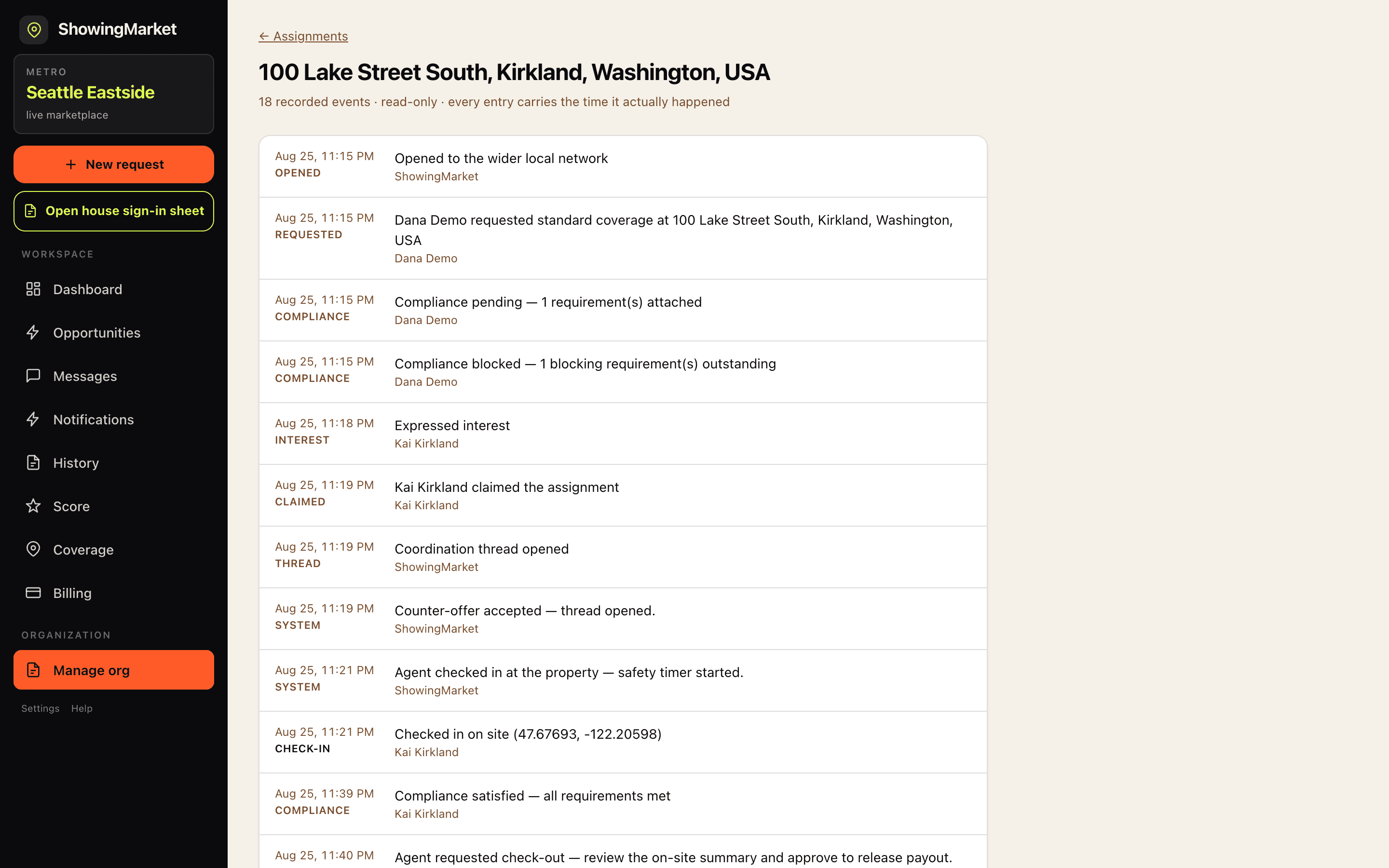
Your agents work the job from their phones; everything they do lands in the record your broker of record reads afterwards; and at an open house, the sign-in sheet turns every walk-in into a row your agent keeps. Real screens from the live product, captured this week — not mockups.
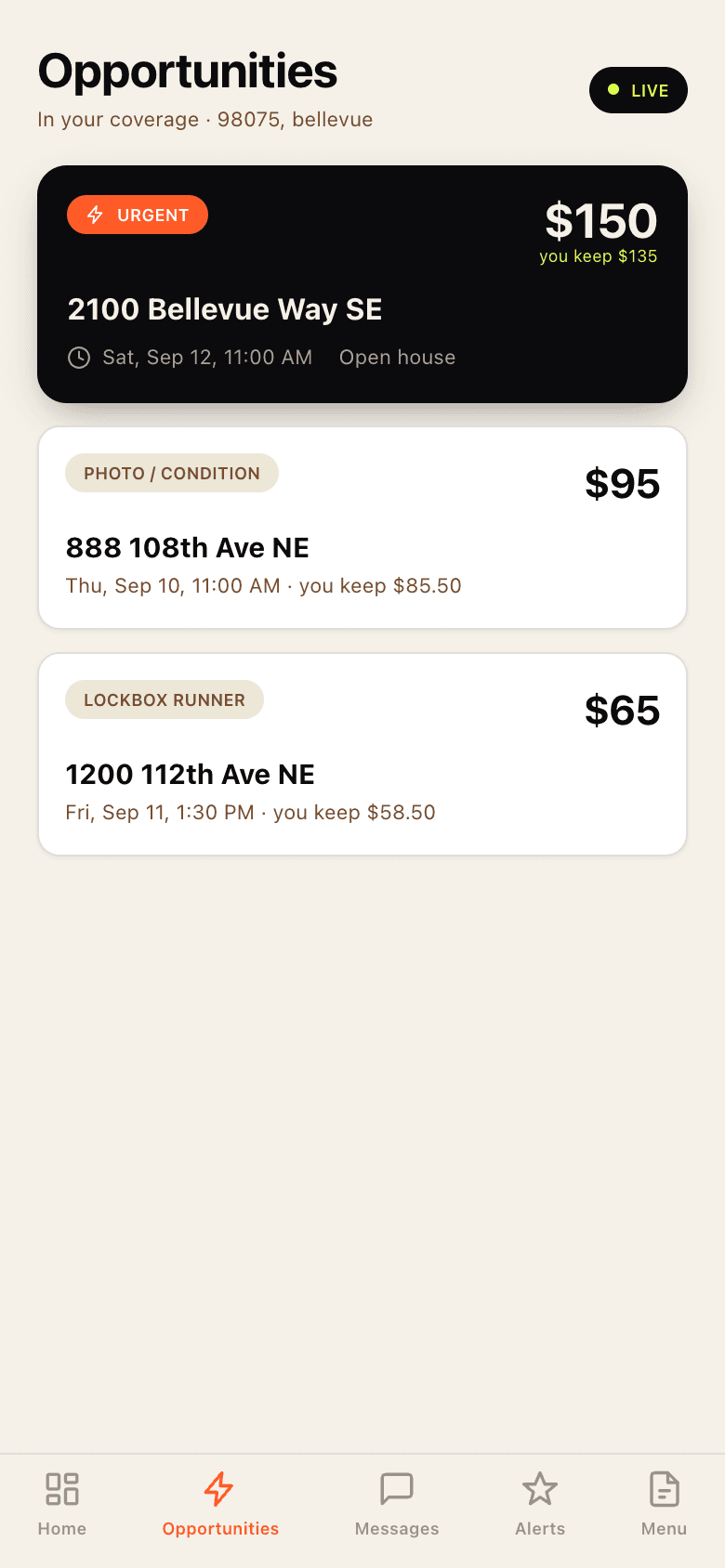
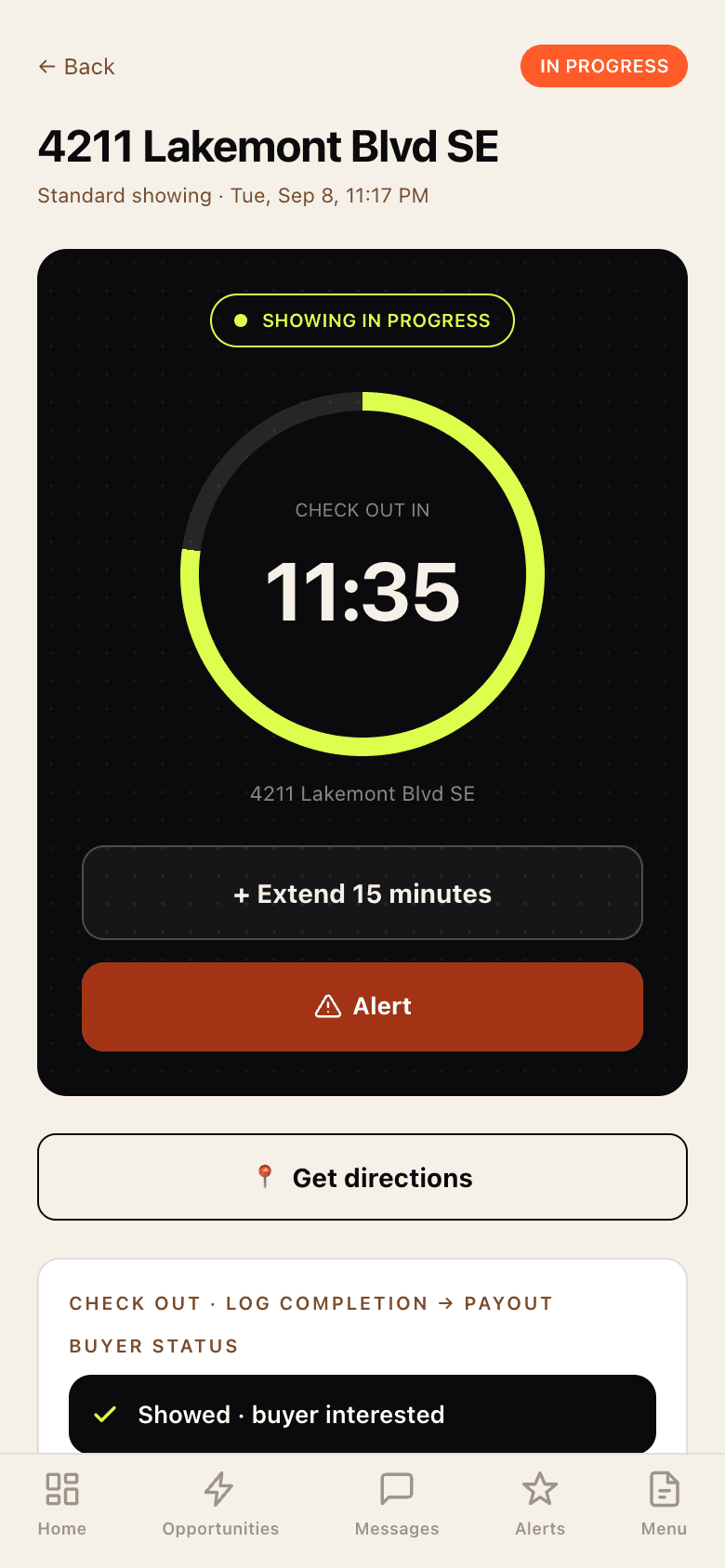
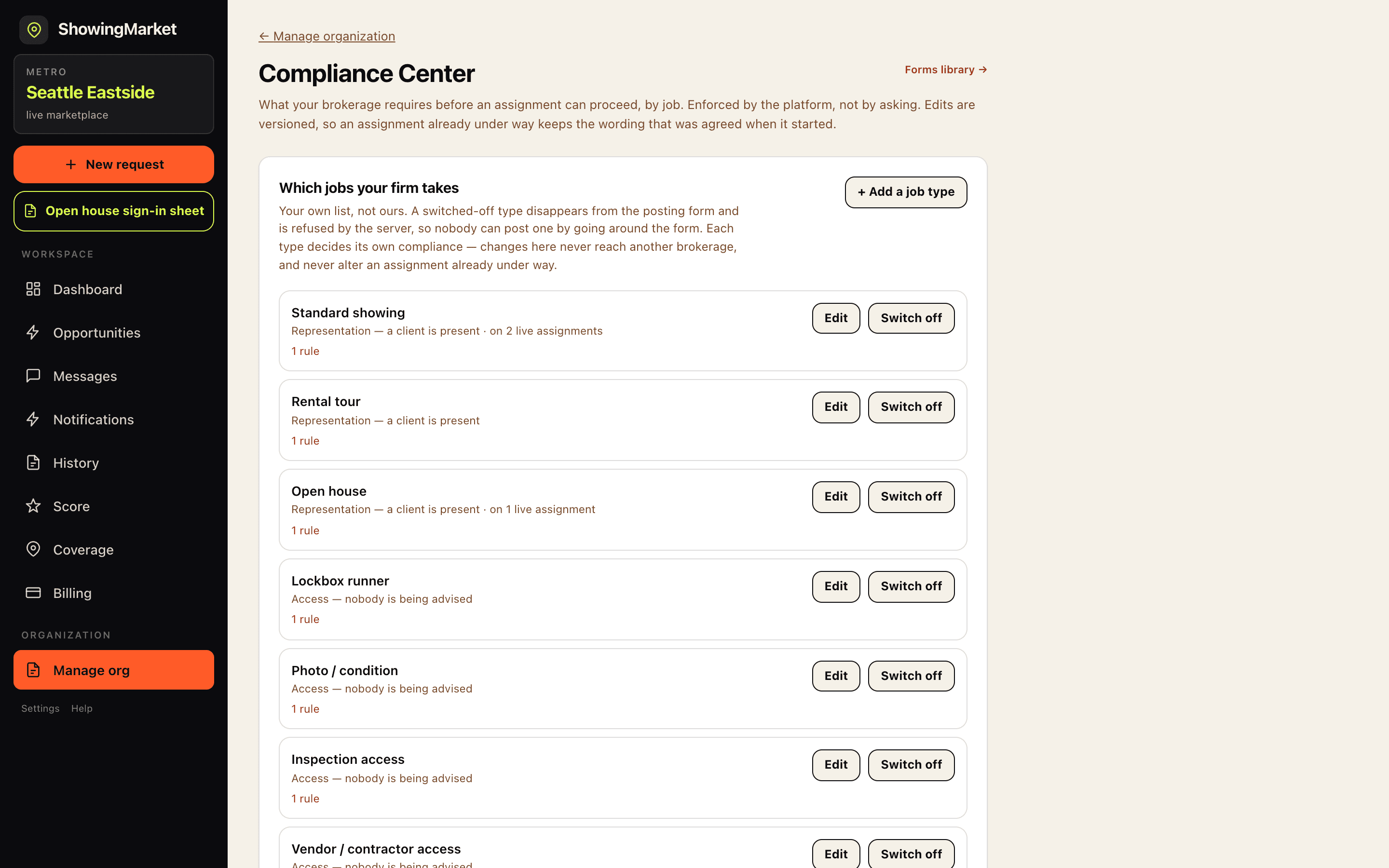
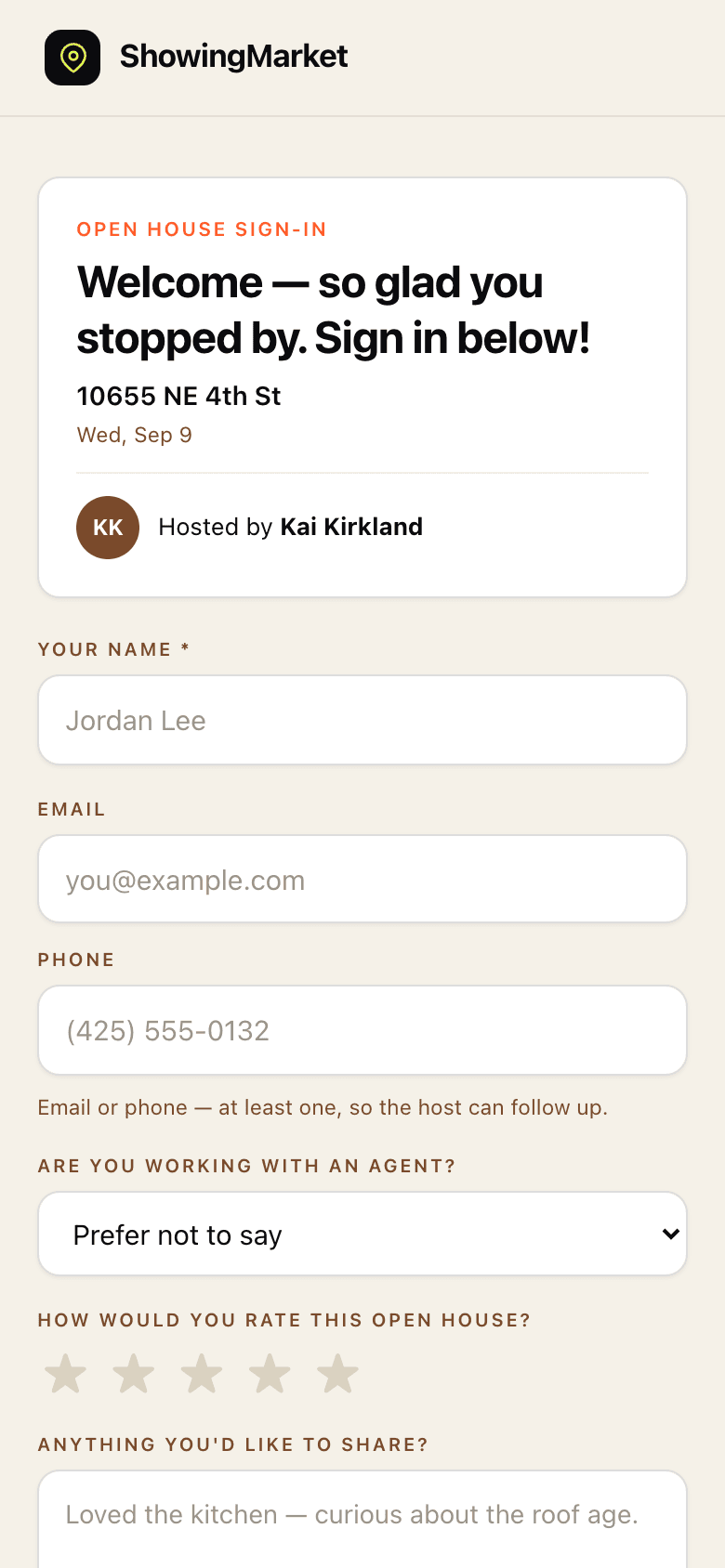
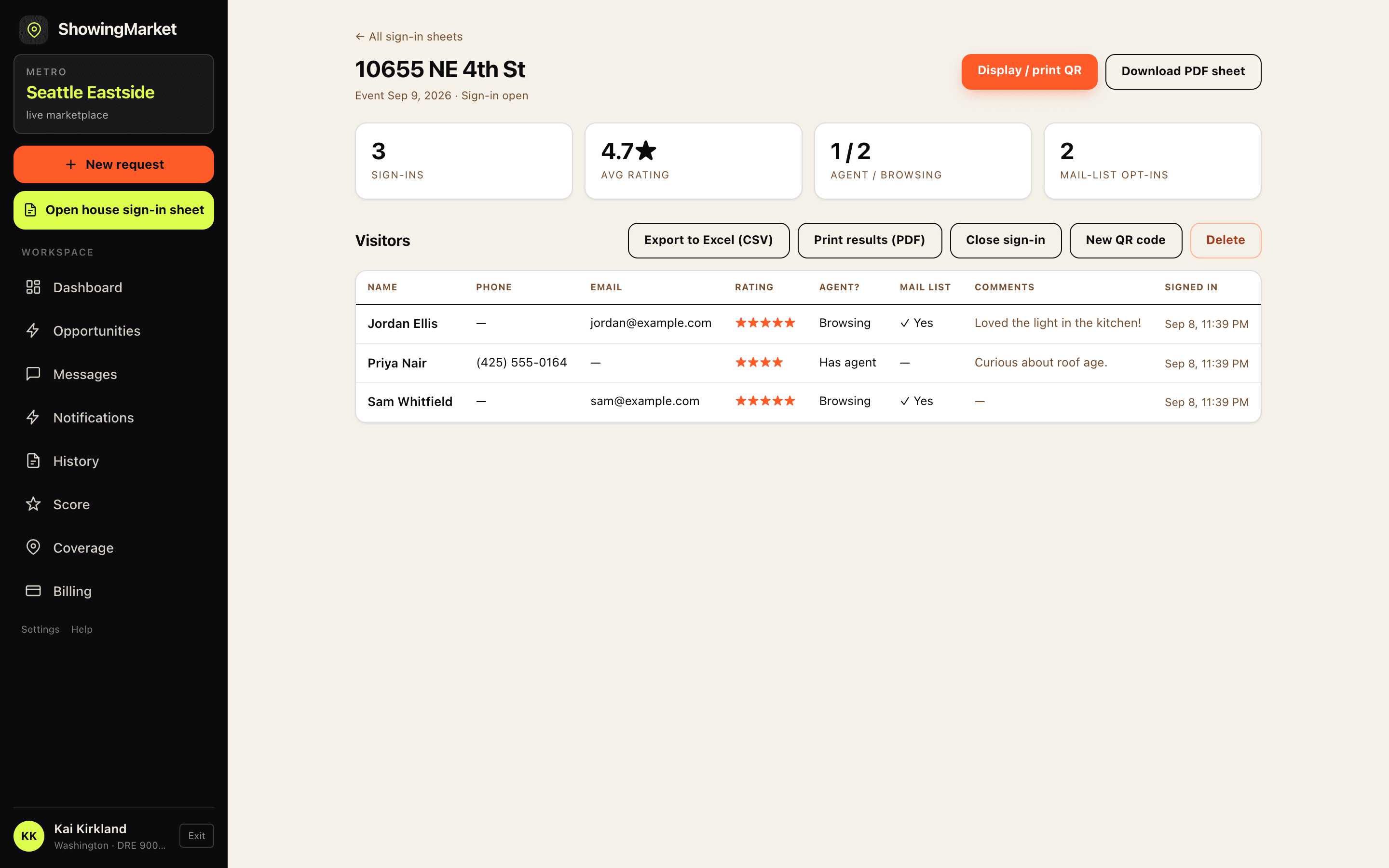
The agent app is live for iPhone and Android — your roster runs it from their own phones, or in the browser.
Keep showing coverage inside your brokerage — or expand it when you choose
Outside agents do not see your brokerage's requests unless your broadcast policy allows it.
Four broadcast modes, one decision made once. Every showing request your agents post follows your organization's policy — no per-request babysitting, no coverage leaking outside before your own roster gets its shot.
Your requests are visible to your agents only — forever. Coverage stays entirely inside the brokerage.
Firms whose policy, clientele or listings will not tolerate an outside agent at the door, and firms running internal coverage as a member benefit rather than a market.
Nothing ever leaves the firm. Fill rate is bounded by your own roster's availability, so a thin Saturday stays thin.
Your agents get an exclusive first look — you set the window, from 1 hour to 7 days. If nobody inside claims it, the request opens to the wider local network automatically.
Most firms, most of the time. Your roster gets first refusal and the fee stays in-house whenever someone is free; when nobody is, the showing still happens.
You set the window yourself. A short one fills faster, a long one keeps more work inside.
Run more than one brokerage? Your agents get first look, then the other firms you manage — all of them at once, on your window. It only reaches the wider network if you say so, and you can say never.
A company running several offices or brands. Overflow reaches your own other offices before anyone else, so the work stays inside the group.
One-directional by design: adding an office here sends your overflow to them, and nothing back. Their routing is set in their own console.
Requests broadcast to every agent covering the area immediately. Maximum fill speed when coverage matters more than exclusivity.
Firms who care more that the showing happens than about who covers it, and firms new to a market where the local network is deeper than the roster.
Fastest fill, and your requests are visible to licensed agents outside the firm from the moment they post.
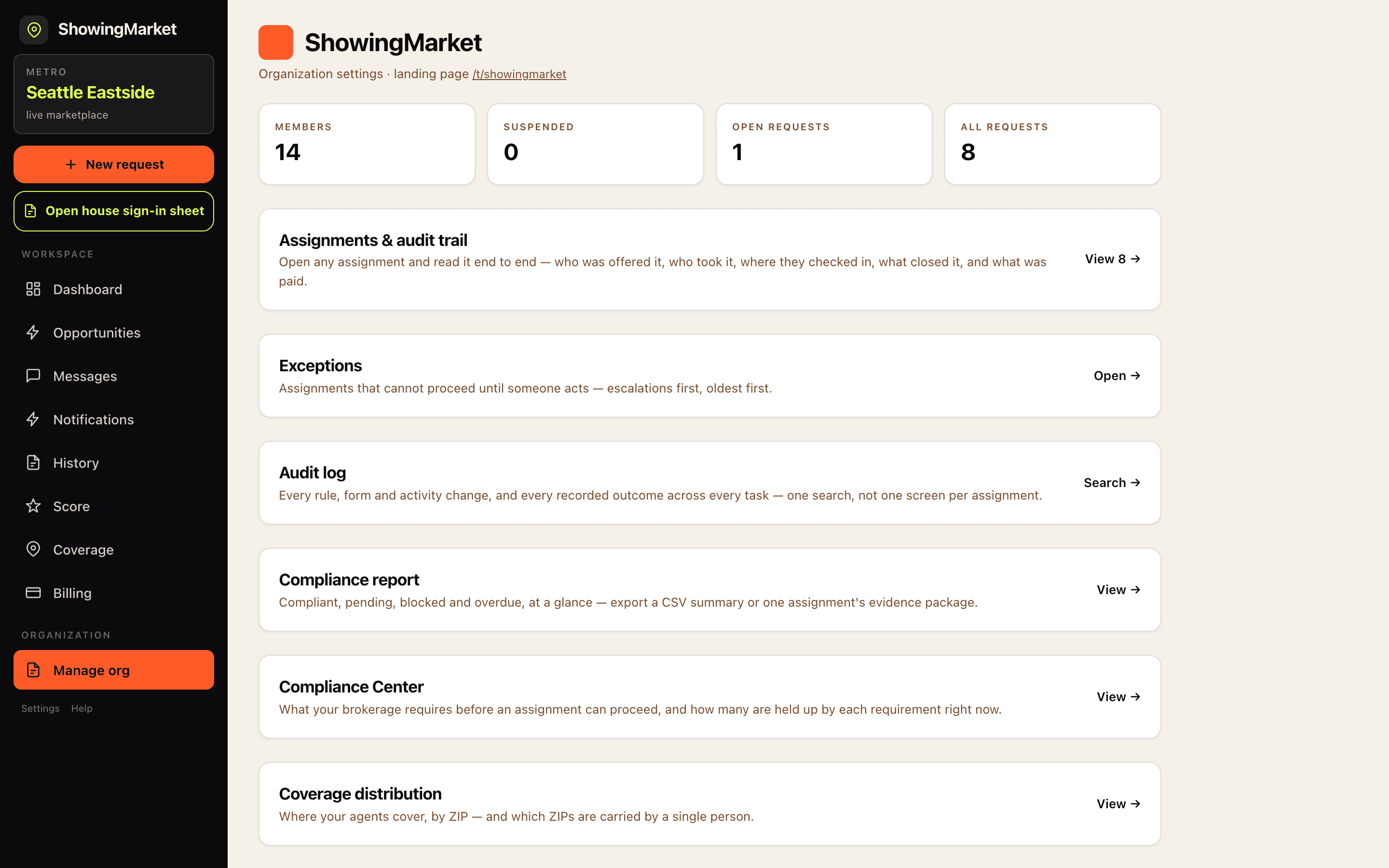
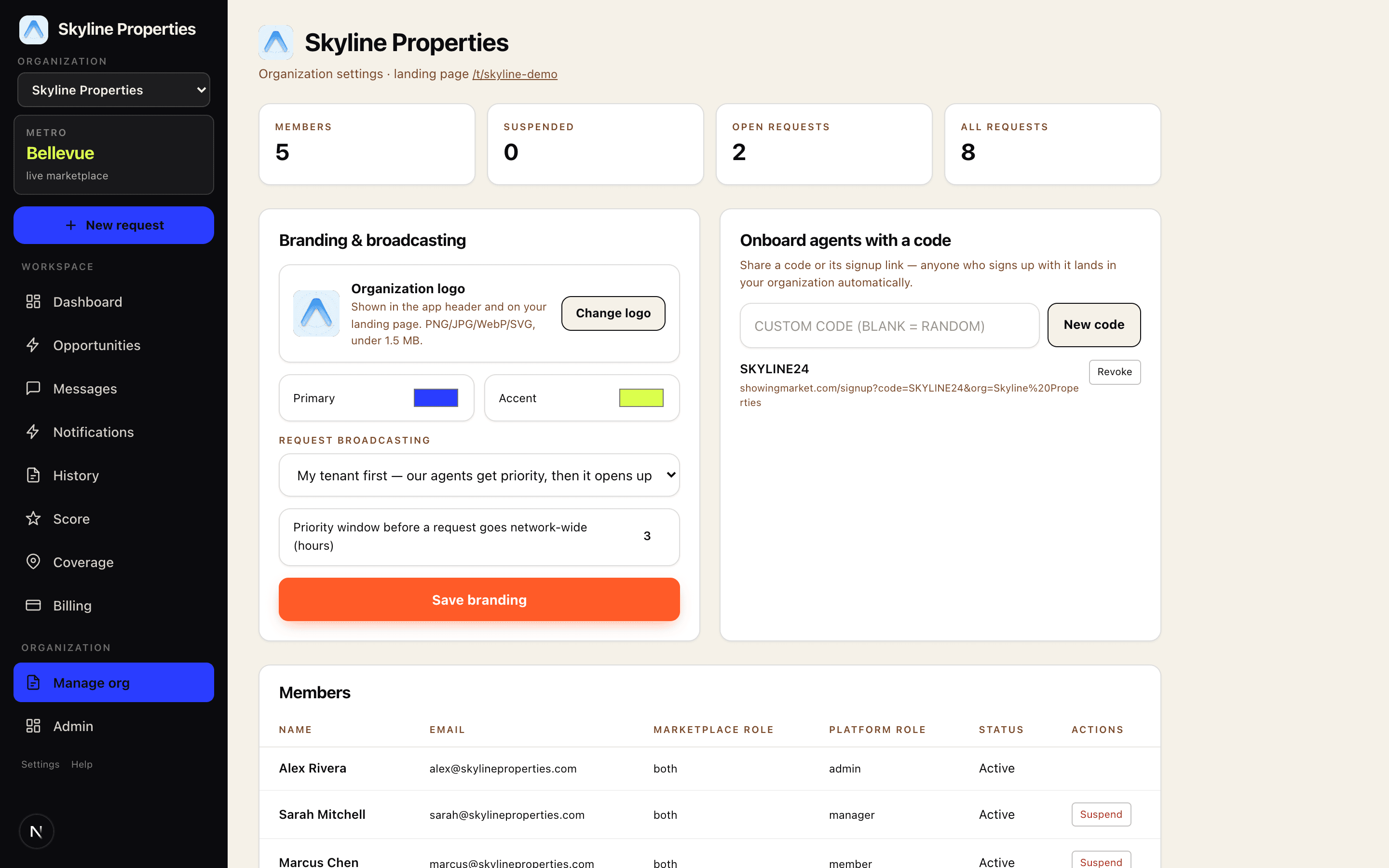
The whole organization on one screen
This is the real management console — members, join codes, branding, broadcasting policy, and live request counts. Most weeks you won't need to open it.
Built to not need an admin
Share a join code or its signup link — anyone who signs up with it lands in your organization automatically, already inside your broadcast policy. No invitations, no CSV imports, no IT ticket.
Upload your logo and set your colors. Your agents see your organization in the app header, and your branded landing page lives at your own /t/your-name link.
Your firm can have several, appointed by ShowingMarket when you onboard. They run the roster, codes, branding and broadcast policy — and nobody inside the organization can appoint another, so there is no path to a broker being promoted or locked out from within.
An agent leaves the brokerage? Suspend them and they're out of your requests and your roster instantly — restore is one click too. Every join code can be revoked the same way.
You keep your own list of the jobs your agents take, in your words, and decide for each one what has to be signed — the instruction, the form itself, and when it is due: before the job is even posted, before an agent takes it, before check-in, before check-out, or before you release payment. The platform refuses at that moment; it does not grey out a button and hope. A buyer showing and a contractor let-in can ask for entirely different things, because they are not the same act.
How enforcement works →Per-showing payments run through Stripe — authorized when a request posts, captured when the work is approved. No monthly invoice, no seat licenses, no minimums. Internal coverage can be set to no fee at all, in which case no payment rail is involved.
What a broker of record can actually see
Designated broker, broker of record, principal broker, broker-in-charge, employing broker, qualifying broker — your state names the role differently and it is the same person here. Supervision is the part that has to hold up after the fact, not the part that looks good in a demo. Every item below is enforced by the database rather than by the app asking nicely.
Open any assignment and read it end to end — who was offered it, who took it, what was said, where they physically were at check-in and check-out, what evidence closed it, and what was paid. Entries appear only where a real timestamp exists; nothing is inferred.
Not a report you remember to run. Assignments that cannot proceed, escalations first, aged from the moment they became a problem. Resolved items leave it. Exportable, with a link back to each audit trail.
An open-house attendee asks the host to represent them. The host raises it in one tap, the assignment stops, and they are shown your firm's own instruction — your words, not ours. Only a designated broker can resolve it, and only with a reason.
Export the firm's complete record — members, coverage, assignments, the full compliance trail, every document reference — as one file, with no ticket and no waiting period. Deletion is a request with a scope, because erasing a firm touches records other people are party to.
A 30-minute working session, not a sales pitch
Bring whoever carries the responsibility. We cover how coverage inside your roster gets supervised, what the compliance record looks like when someone asks for it a year later, the broadcast policy that fits how you work, and what onboarding your agents actually takes.
Not ready for a call? Leave your email instead — we reply within one business day.
How brokerage onboarding works: live in three steps
- 1Contact us below — we set up your organization for free: name, logo, colors, and the broadcast policy that fits how you work.
- 2Send one join code to your roster. Agents sign up free, enter the code, and they're in — under your branding and inside your broadcast policy.
- 3Your agents post and cover showings under your rules. You check the dashboard when you feel like it.
The whole thing, in one document
An eighteen-page walkthrough of what your agents see, what you control, and what the compliance record looks like — every screen captured from running software, not designed for a slide. It ends with the questions brokerages actually ask us, answered.
- OnboardingRoster upload, join codes, and who sends the invitations.
- ControlsBroadcast policy, coverage distribution, and what a designated broker sees.
- ComplianceThe Compliance Center, enforced server-side, plus the exception queue and the audit trail.
Frequently asked questions about showing coverage for brokerages
What is real estate showing coverage?
Showing coverage is when another licensed real estate agent handles a showing, open house, inspection access, or similar property visit when the original agent cannot attend. ShowingMarket creates a structured record of that coverage and lets the brokerage control how the request is distributed.
Can our brokerage keep showing coverage internal?
Yes. A brokerage can keep requests private to its own agents or give its roster an exclusive priority window before a request reaches a wider network. The brokerage controls the broadcast policy.
Can outside agents see our brokerage's showing requests?
Only when the brokerage's broadcast policy allows it. A firm can keep requests internal, prioritize its own agents, include affiliated firms it manages, or use the wider network.
What does ShowingMarket cost the brokerage?
ShowingMarket has no brokerage setup fee, subscription, or seat license. Internal coverage can also be configured with no agent-to-agent fee, in which case no payment rail is involved.
How does ShowingMarket document a covered showing?
Each assignment records who received the request, who accepted it, check-in and check-out activity, required evidence, notes, and payment information. The brokerage can open the assignment record later as an audit trail.
Can a broker require forms or approvals before a showing?
Yes. A brokerage can configure requirements at defined stages of the workflow: before posting, before an agent takes the assignment, before check-in, before check-out, or before payment release. The platform enforces them server-side.
Can ShowingMarket be used for open house coverage?
Yes. Open house hosting is one of the coverage scenarios ShowingMarket supports, along with buyer showings, rental tours, inspection access, lockbox runs, and photo or condition visits.
Is ShowingMarket a brokerage?
No. ShowingMarket facilitates showing coverage between licensed real estate professionals and is not itself a brokerage.
Coverage is already happening. Put your name on it.
Tell us who you are and we'll set up your organization — branding, broadcast policy, and your join code — free. No setup fee, no subscription; your agents pay only per completed showing, like everyone else.
On Zoom · not a sales pitch. Prefer email?